 GIScases
Buffer zones
Turning a distance criterion into an explicit zone around geographic features.
Proximity — how near or far one thing is from another — is one of the central questions of spatial analysis. The buffer is the operation that answers it directly: it converts a distance rule into a mapped area that can be measured, displayed and combined with other data. It is among the most widely used tools in any GIS.
A buffer is the zone around a geographic feature that contains all locations lying within a specified distance — the buffer distance — of that feature. Buffering is one of the core operations of spatial analysis and the principal tool of proximity analysis: it turns a distance criterion into an explicit area that can be measured, mapped and combined with other layers.
Buffering the three primitives
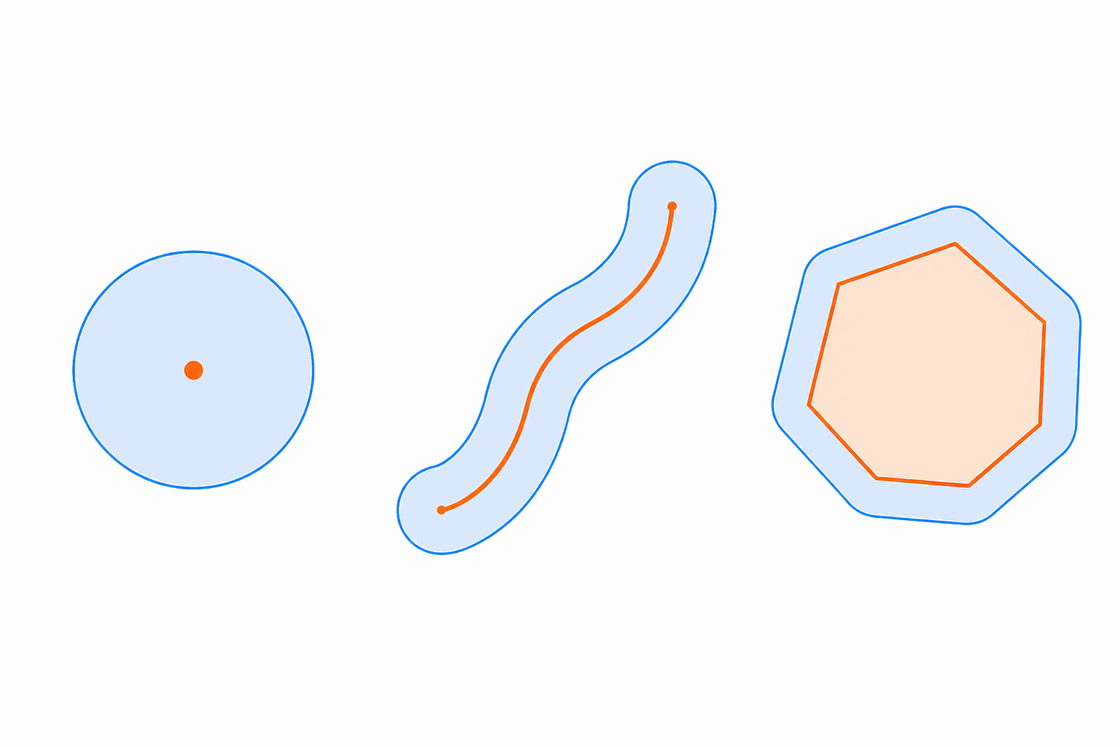
The shape of a buffer follows the geometry of its input feature:
- Point → a circle (disk) of radius d centred on the point.
- Line → a corridor of width 2d along the line, closed at each end by a cap.
- Polygon → the polygon expanded outward by d, its corners rounded by arcs of radius d.
Internally the tool traverses each feature's vertices and constructs offset curves parallel to every segment at distance d; the buffer boundary is the envelope of those offsets.
Measuring the distance: Euclidean or geodesic
How a buffer measures distance affects its accuracy. Two methods are standard in GIS:
- Euclidean (planar) buffers measure distance in a two-dimensional Cartesian plane — straight-line distance on a flat surface. They are best for features in a projected coordinate system concentrated in a relatively small area, such as a single UTM zone, where distortion is small.
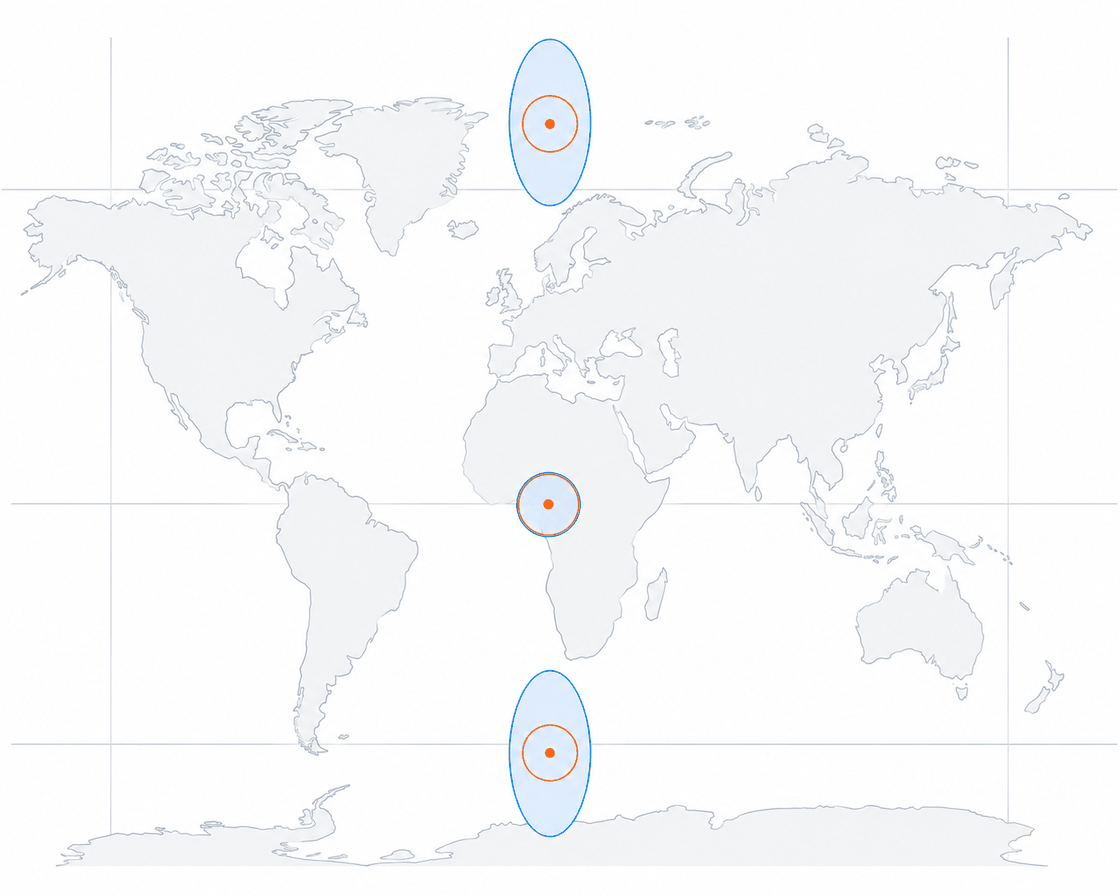
- Geodesic buffers account for the curvature of the spheroid and correctly handle data near and across the dateline and poles. They are best when the data cover a large geographic extent, or when the coordinate system of the input is unsuitable for distance calculation.
The difference is practical. On a Mercator projection a 1000-km Euclidean buffer is accurate near the equator but increasingly wrong toward the poles, where the projection stretches distance — all such Euclidean buffers are drawn the same size regardless of latitude, while geodesic buffers of the same distance remain correct everywhere on the globe. Most GIS software selects the method automatically from the input: Euclidean buffers for projected data, and geodesic buffers for data in a geographic coordinate system when the distance is given in linear units.
Buffer distance: fixed or attribute-driven
The buffer distance need not be constant. It may be a single fixed value, or it may be read from an attribute field, so that each feature is buffered by its own value in one operation — a major road by 100 m, a minor lane by 30 m. This produces a variable-width buffer.
Controlling the geometry
Several parameters govern the exact shape of the output. The main ones:
| Parameter | Options and effect |
|---|---|
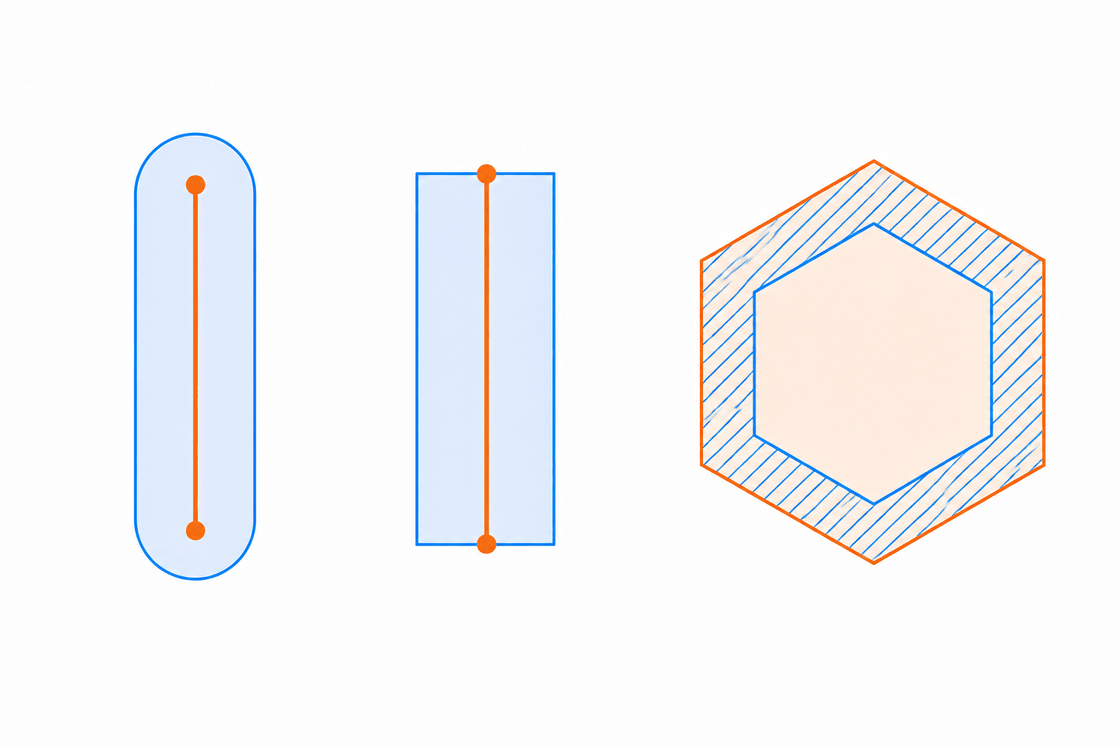
| Side type (lines / polygons) | Full — both sides of a line, or the ring around a polygon (default). Left / Right — one topological side of a line only. Outside only — for polygons, the input area is erased, leaving just the surrounding ring. |
| End type (lines) | Round — a semicircular cap (default). Flat — squared off exactly at the line's endpoint. |
| Negative distance (polygons) | A setback buffer: the polygon is shrunk inward by d. If d is large enough the polygon collapses to nothing and no geometry is produced. |
Overlapping buffers: dissolve and rings
When many features are buffered, their zones usually overlap, and you must decide how to treat the overlap:
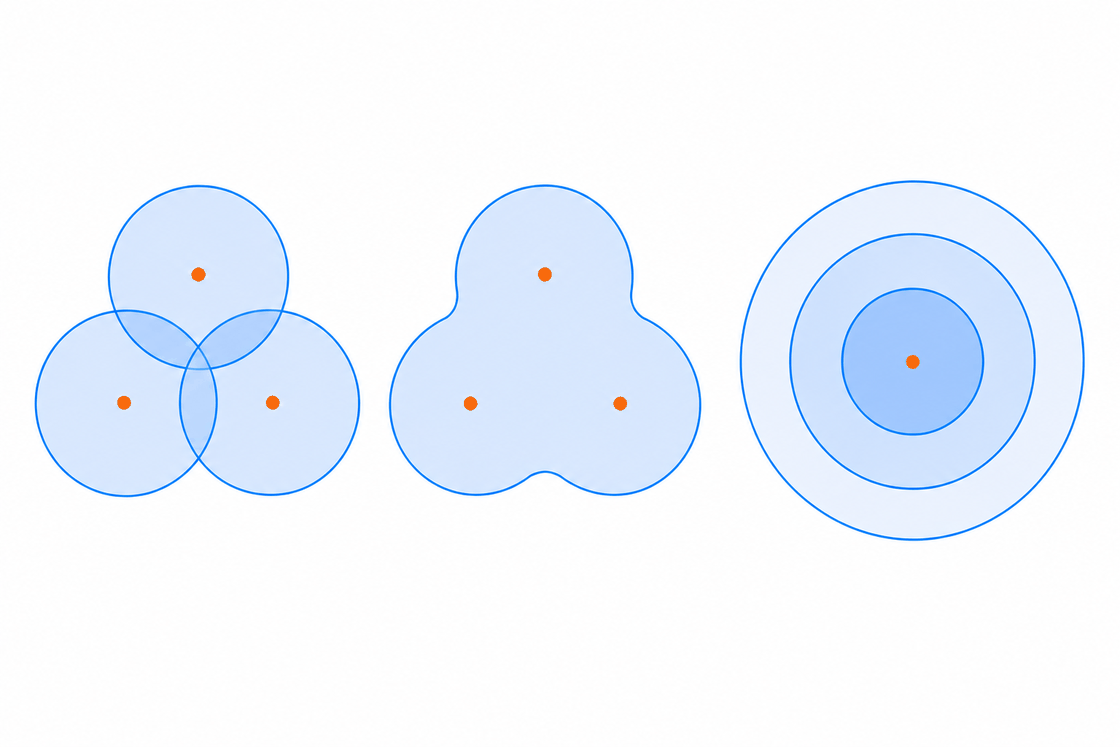
- No dissolve — one buffer polygon per feature is kept, overlaps and all.
- Dissolve — overlapping buffers are merged into a single continuous zone (their geometric union). This is what a protection or exclusion zone normally requires.
Concentric buffers at increasing distances — 100 m, 200 m, 300 m — form a multiple-ring (graduated) buffer. Each ring is an annulus between two distances, useful for modelling how an effect weakens with distance.
Inclusion and exclusion: within vs beyond
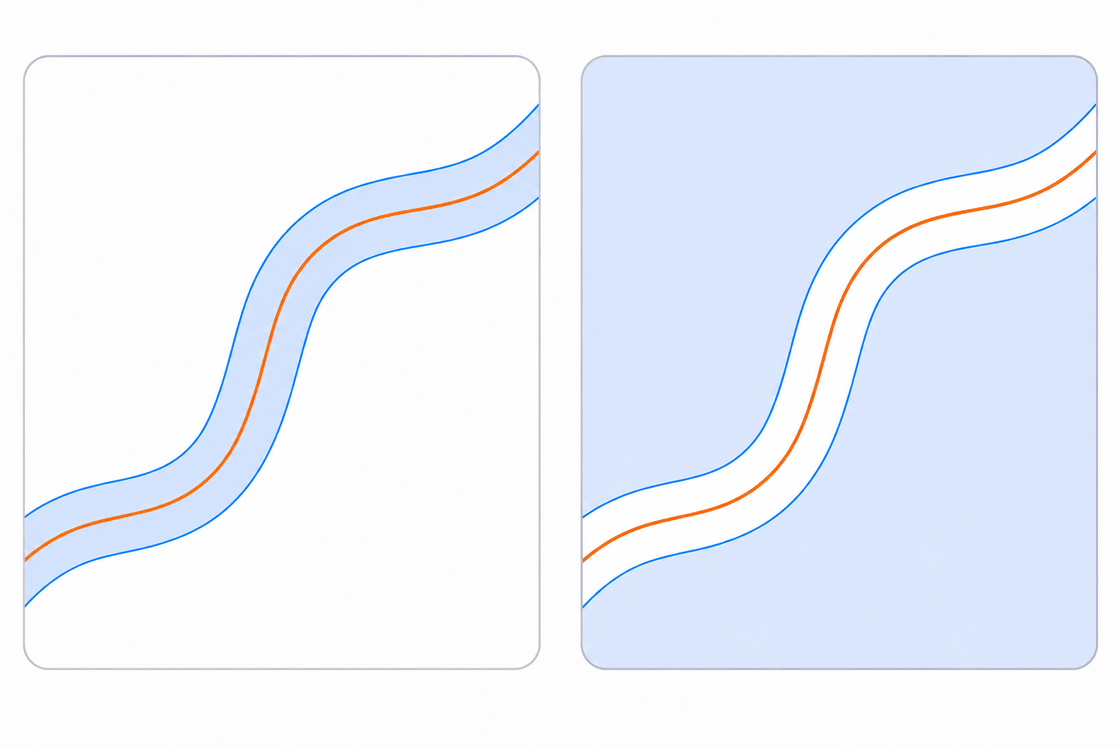
A buffer only draws the zone; its role in analysis depends on how that zone is then applied as a criterion — to include or to exclude locations. One buffer distance therefore supports two opposite rules:
- Inclusion (inclusive) buffer — keep what lies within the distance. For example, “a site must be within 2 km of a highway”: the 2 km buffer is the permitted zone.
- Exclusion buffer — keep what lies beyond the distance. For example, “no bar within 1000 ft of a school”: the buffer marks the forbidden zone, and the allowed ground is everything outside it.
“Within 200 m of water” and “beyond 200 m from water” are built from the same buffer — inclusion keeps the zone, exclusion keeps everything else. Deciding which sense a criterion takes, proximity or avoidance, is a core analytical judgement. In site-suitability analysis several inclusion and exclusion buffers are combined by overlay, keeping only the ground that satisfies them all.
Where buffers are used
Buffers formalise distance-based rules that appear across the discipline: riparian and shoreline setbacks protecting watercourses; exclusion zones around hazards, airports or protected habitats; noise and pollution contours; approximate service areas around facilities. Their real power emerges when several buffers are combined by overlay — near a road and near water and away from town — keeping only the ground where every condition holds. That combination is the heart of site-suitability analysis, the subject of the next lesson.
What you’ll learn in this lesson
- A buffer is the zone containing all locations within a distance of a feature — one of the core operations of spatial analysis and the principal tool of proximity analysis.
- Buffer geometry follows the input: point → circle, line → corridor with end caps, polygon → outward offset (or inward for a negative/setback buffer).
- Distance can be measured two ways: Euclidean (planar) for projected data over a small area, or geodesic for large extents or coordinate systems unsuitable for distance calculation — the wrong choice distorts the result.
- Distance can be fixed or attribute-driven; overlapping buffers can be kept separate or dissolved into a union; concentric distances give multiple-ring buffers.
- Used as a criterion, a buffer is either inclusive (keep what is within) or an exclusion buffer (keep what is beyond); combining several by overlay underlies site-suitability analysis.
References
- Bolstad, P. (2019) GIS Fundamentals: A First Text on Geographic Information Systems. 6th edn. Ann Arbor, MI: XanEdu.
- Campbell, J. and Shin, M. (2011) Essentials of Geographic Information Systems. Saylor Foundation.
- de Smith, M.J., Goodchild, M.F. and Longley, P.A. (2018) Geospatial Analysis: A Comprehensive Guide to Principles, Techniques and Software Tools. 6th edn. Edinburgh: The Winchelsea Press.
- Esri (2026) Buffer (Analysis Tools). ArcGIS Pro 3.7 tool reference. Available at: https://doc.esri.com/en/arcgis-pro/latest/tool-reference/analysis/buffer.html (Accessed: July 2026).
- Esri (2026) Buffer 3D (3D Analyst). ArcGIS Pro tool reference. Available at: https://pro.arcgis.com/en/pro-app/latest/tool-reference/3d-analyst/buffer-3d.htm (Accessed: July 2026).
- Esri (2026) How Buffer (Analysis) works. ArcGIS Pro 3.7 tool reference. Available at: https://doc.esri.com/en/arcgis-pro/latest/tool-reference/analysis/how-buffer-analysis-works.html (Accessed: July 2026).
- Longley, P.A., Goodchild, M.F., Maguire, D.J. and Rhind, D.W. (2015) Geographic Information Science and Systems. 4th edn. Hoboken, NJ: Wiley.
 Made by Solebo
GIScases · Learn — free to use in your classroom.
Made by Solebo
GIScases · Learn — free to use in your classroom.